iperf、iperf3 命令详解
|
选择喜欢的代码风格
A B C D E F G H I J K L M N O P Q R S T U V W X Y Z
iperf、iperf3 命令用于测量计算机之间的网络带宽。jperf 与 iperf 一起使用的话可以提供一个
java 写成的图形界面。

iperf 命令安装:
-bash/zsh: iperf: command not found

# Windows (WSL2)
sudo apt-get update sudo apt-get install iperf

# Debian
apt-get install iperf

# Ubuntu
apt-get install iperf

# Alpine
apk add iperf

# Arch Linux
pacman -S iperf

# Kali Linux
apt-get install iperf

# Fedora
dnf install iperf

# OS X
brew install iperf

# Raspbian
apt-get install iperf

# Dockerfile
dockerfile.run/iperf

# Docker
docker run cmd.cat/iperf iperf
iperf3 命令安装:
-bash/zsh: iperf3: command not found

# Windows (WSL2)
sudo apt-get update sudo apt-get install iperf3

#  Debian
apt-get install iperf3

#  Ubuntu
apt-get install iperf3

#  Alpine
apk add iperf3

#  Arch Linux
pacman -S iperf3

#  Kali Linux
apt-get install iperf3

#  CentOS
yum install iperf3

#  Fedora
dnf install iperf3

#  OS X
brew install iperf3

#  Raspbian
apt-get install iperf3

#  Dockerfile
dockerfile.run/iperf3

#  Docker
docker run cmd.cat/iperf3 iperf3
iperf、iperf3 命令补充说明:
iperf、iperf3 命令用于执行网络吞吐量测量的工具。 它可以测试 TCP 或 UDP 吞吐量。 要执行 iperf 测试,用户必须建立服务器(用于丢弃流量)和客户端(用于生成流量)。
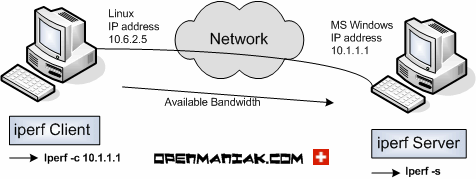
iperf 命令
扩展阅读:jperf
jperf 是有图形 GUI 介面的 iperf,不过他是架构在 iperf 必须先安装过 iperf 才可以使用.
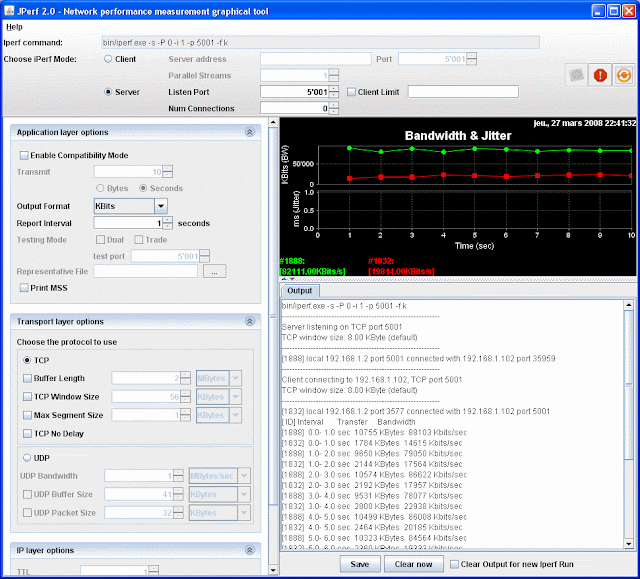
jperf GUI
iperf 命令语法:
iperf -s [ options ]

iperf -c server [ options ]

iperf -u -s [ options ]

iperf -u -c server [ options ]

========================================

iperf3 -s [ options ]

iperf3 -c server [ options ]
iperf、iperf3 命令选项:
-f, --format
      [kmKM] format to report: Kbits, Mbits, KBytes, MBytes

-h, --help
      print a help synopsis

-i, --interval n
      pause n seconds between periodic bandwidth reports

-l, --len n[KM]
      set length read/write buffer to n (default 8 KB)

-m, --print_mss
      print TCP maximum segment size (MTU - TCP/IP header)

-o, --output <filename>
      output the report or error message to this specified file

-p, --port n
      set server port to listen on/connect to to n (default 5001)

-u, --udp
      use UDP rather than TCP

-w, --window n[KM]
      TCP window size (socket buffer size)

-B, --bind <host>
      bind to <host>, an interface or multicast address

-C, --compatibility
      for use with older versions does not sent extra msgs

-M, --mss n
      set TCP maximum segment size (MTU - 40 bytes)

-N, --nodelay
      set TCP no delay, disabling Nagle's Algorithm

-v, --version
      print version information and quit

-V, --IPv6Version
      Set the domain to IPv6

-x, --reportexclude
      [CDMSV] exclude C(connection) D(data) M(multicast) S(settings) V(server) reports

-y, --reportstyle C|c
      if set to C or c report results as CSV (comma separated values)
iperf、iperf3 命令实例:
iperf 启动 Server 端:
iperf -s
iperf 使用 UDP 模式 在服务器上运行并设置服务器端口监听 5001:
iperf -u -s -p 5001
iperf 已客户端方式运行,并连接到目标装有 iperf 的 Server 的地址:
iperf -c server_address
iperf 每隔 2 秒在客户端运行一次:
iperf -c server_address -i 2
iperf 客户端,启动 5 个并行线程运行:
iperf -c server_address -P 5
iperf 使用 UDP 模式在客户端运行:
iperf -u -c server_address -p 5001
在多个并行流中运行 iperf3:
iperf3 -c server -P streams
iperf3 反转测试方向,服务器向客户端发送数据:
iperf3 -c server -R
iperf、iperf3 扩展阅读:
- iPerf - The TCP, UDP and SCTP network bandwidth measurement tool
- iperf、iperf3 命令
- IP 子网掩码对照速记表
- ip 命令
- perf 命令
- iptraf、iptraf-ng 命令详解
- mtr 命令
- drill 命令
- IPv4 地址查询(IP 库查询)
- fping 命令
CommandNotFound ⚡️ 坑否 - 其他频道扩展阅读:
iperf、iperf3 命令评论
网络相关
-
ab 命令
apachectl 命令
arp 命令
arp-scan 命令
arpd 命令
arping 命令
arptables 命令
arpwatch 命令
axel 命令
az 命令
bmon 命令
bye 命令
cu 命令
curl 命令
dhclient 命令
dhcpd 命令
dhcrelay 命令
dig 命令
dnsdomainname 命令
domainname 命令
drill 命令
ethtool 命令
fping 命令
gdrive 命令
host 命令
http 命令
ifcfg 命令
ifconfig 命令
ifdown 命令
ifstat 命令
ifup 命令
ip 命令
iperf、iperf3 命令
iptraf、iptraf-ng 命令
lsof 命令
mtr 命令
nc 命令
nethogs 命令
netstat 命令
nisdomainname 命令
nload 命令
nmap 命令
nscd 命令
nslookup 命令
ping 命令
pssh 命令
rcp 命令
route 命令
rsstail 命令
rsync 命令
scp 命令
sendmail 命令
speedometer 命令
ss 命令
ssh 命令
sslscan 命令
sysdig 命令
tc 命令
tcpdump 命令
tcpflow 命令
tcping 命令
telnet 命令
traceroute 命令
ufw 命令
vue 命令
w3m 命令
wget 命令
whois 命令
wrk 命令
wuzz 命令
ypdomainname 命令
yppasswd 命令
共收录到 552 个 Linux 命令