dive 命令详解
|
选择喜欢的代码风格
A B C D E F G H I J K L M N O P Q R S T U V W X Y Z
dive 命令用于探索 docker 镜像、分层内容以及发现缩小
Docker / OCI 镜像大小的方法的工具。
dive 命令安装:
-bash/zsh: dive: command not found

# Windows
https://github.com/wagoodman/dive/releases/latest

# Ubuntu/Debian
export DIVE_VERSION=$(curl -sL "https://api.github.com/repos/wagoodman/dive/releases/latest" | grep '"tag_name":' | sed -E 's/.*"v([^"]+)".*/\1/')
curl -OL https://github.com/wagoodman/dive/releases/download/v${DIVE_VERSION}/dive_${DIVE_VERSION}_linux_amd64.deb
sudo apt install ./dive_${DIVE_VERSION}_linux_amd64.deb


# RHEL/Cent OS
export DIVE_VERSION=$(curl -sL "https://api.github.com/repos/wagoodman/dive/releases/latest" | grep '"tag_name":' | sed -E 's/.*"v([^"]+)".*/\1/')
curl -OL https://github.com/wagoodman/dive/releases/download/v${DIVE_VERSION}/dive_${DIVE_VERSION}_linux_amd64.rpm
rpm -i dive_${DIVE_VERSION}_linux_amd64.rpm

# Arch Linux
pacman -S dive

# NixOS
nix-env -iA nixos.dive

# Mac Homebrew
brew install dive

# MacPorts
sudo port install dive

# Docker 运行
docker pull wagoodman/dive

或者
docker pull quay.io/wagoodman/dive

# 使用该镜像运行一个临时的容器,加上我们需要分析的镜像
docker run --rm -it \
    -v /var/run/docker.sock:/var/run/docker.sock \
    wagoodman/dive:latest <dive arguments...>
dive 命令补充说明:
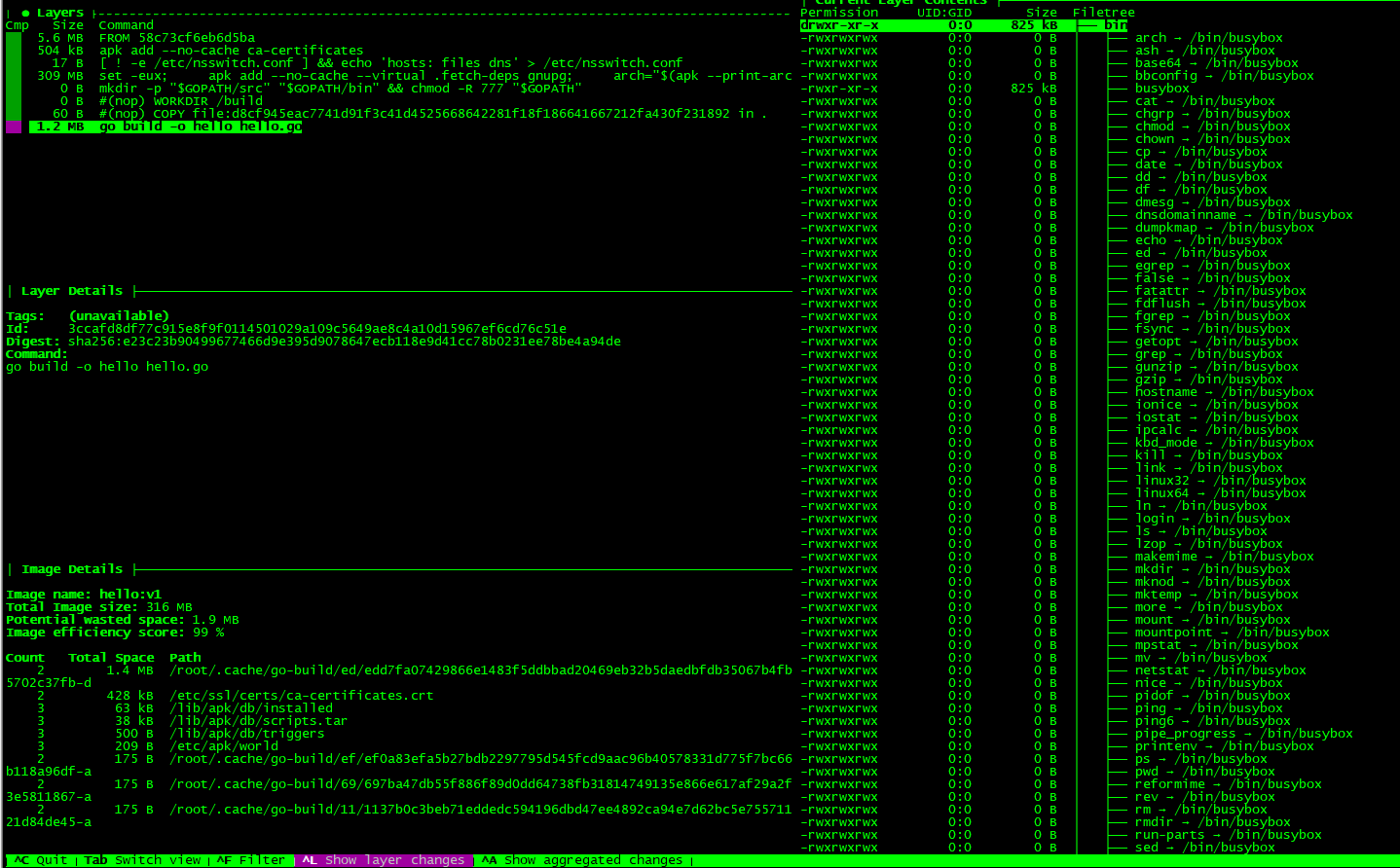
dive
按层显示 Docker 镜像内容:在左侧选择一个图层时,将显示该图层的内容以及右侧的所有先前图层。此外,您还可以使用箭头键全面浏览文件树。
指出每一层的变化:文件树中指示已更改,修改,添加或删除的文件。可以对其进行调整以显示特定层的更改,或显示直到该层的汇总更改估计。
图像效率:左下方的窗格显示基本图层信息和实验指标,该指标将猜测图像所包含的浪费空间。这可能是由于跨层复制文件,跨层移动文件或没有完全删除文件。提供百分比 得分 和 总浪费文件空间。
快速的构建 / 分析周期:您可以构建一个 Docker 镜像并使用以下命令立即进行分析:dive build -t some-tag。您只需要用 docker build 相同的 dive build 命令替换命令即可。
dive 命令语法:
# Analyze a Docker image
dive [your_image_tag]

# Build an image and start analyzing it
dive build -t [some_tag]

dive [IMAGE] [flags]
dive [command]
dive 命令选项:
Available Commands:
  build       Builds and analyzes a docker image from a Dockerfile (this is a thin wrapper for the `docker build` command).
  help        Help about any command
  version     print the version number and exit (also --version)

Flags:
      --ci                                Skip the interactive TUI and validate against CI rules (same as env var CI=true)
      --ci-config string                  If CI=true in the environment, use the given yaml to drive validation rules. (default ".dive-ci")
      --config string                     config file (default is $HOME/.dive.yaml, ~/.config/dive/*.yaml, or $XDG_CONFIG_HOME/dive.yaml)

  -h, --help                              help for dive
      --highestUserWastedPercent string   (only valid with --ci given) highest allowable percentage of bytes wasted (as a ratio between 0-1), otherwise CI validation will fail. (default "0.1")
      --highestWastedBytes string         (only valid with --ci given) highest allowable bytes wasted, otherwise CI validation will fail. (default "disabled")

  -i, --ignore-errors                     ignore image parsing errors and run the analysis anyway

  -j, --json string                       Skip the interactive TUI and write the layer analysis statistics to a given file.
      --lowestEfficiency string           (only valid with --ci given) lowest allowable image efficiency (as a ratio between 0-1), otherwise CI validation will fail. (default "0.9")
      --source string                     The container engine to fetch the image from. Allowed values: docker, podman, docker-archive (default "docker")

  -v, --version                           display version number

----------------------------------------------------------------
Use "dive [command] --help" for more information about a command.
dive 命令实例:
dive 使用该 --source 选项,您可以选择从何处获取容器图像:
dive <your-image> --source <source>

or

dive <source>://<your-image>
source 选项支持:

docker:Docker引擎(默认选项)
docker-archive:来自磁盘的 Docker Tar 存档
podman:Podman引擎(仅Linux)
dive 命令扩展阅读:
CommandNotFound ⚡️ 坑否 - 其他频道扩展阅读:
dive 命令评论
奇淫巧技
-
Linux TCP 状态 TIME_WAIT 过多的处理
No space left on device:Inode 已耗尽
云平台 Linux 服务器问题场景分析思路及工具箱
ngx_waf 安装避坑
MS-DOS vs. Linux 和 Unix
云服务器 SSH 连接一段时间就断掉的解决办法
Git 的 CRLF,LF 问题
用 Bash 脚本监控 Linux 上的内存使用情况
Linux 查看硬盘信息方法总结
vim 列编辑模式总结
Web 状态码检测监控提醒
Antigen
命令行录制工具 asciinema
certbot 命令
certbot-auto 命令
dash 命令
dive 命令
fish 命令
hr 命令
hugo 命令
jhat 命令
ksh 命令
oh-my-zsh
opencc 命令
progress 命令
screen 命令
wine 命令
xeyes 命令
xxd 命令
zsh 工具
共收录到 552 个 Linux 命令