DomPDF 中文乱码解决
|
选择喜欢的代码风格
PHP 通过
composer 安装的 dompdf/dompdf 生成 PDF 中文乱码问题,完美解决方案。
DOMPDF 是一个支持 CSS 2.1 语法,可以将 HTML 到 PDF 完美转换的包,默认情况下,中文会出现类似下面情况:
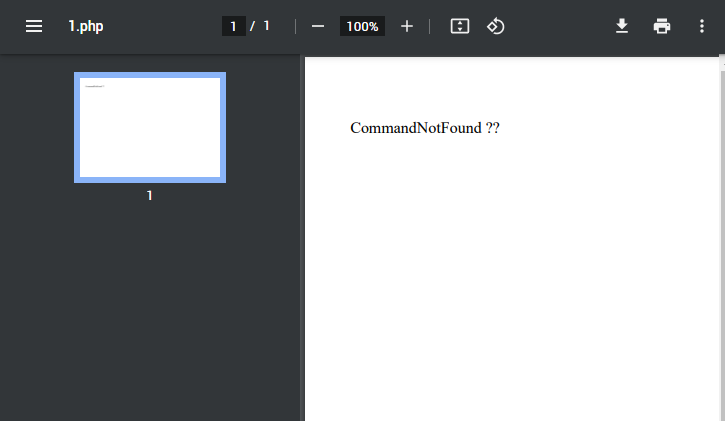
从本质上讲,dompdf 是(主要是)一个用 PHP 编写的符合 CSS 2.1 的 HTML 布局和渲染引擎。 它是一个样式驱动的渲染器:它将下载和读取外部样式表、内联样式标签以及单个 HTML 元素的样式属性。 它还支持大多数表现形式的 HTML 属性,接下来介绍如何完美解决 DOMPDF 中文乱码问题。
通过 composer 安装 dompdf:
composer require dompdf/dompdf
CLI 命令行生成 dompdf 支持中文字体或其他自定义字体:
要使用自定义的字体,以及中文字体,要使用 dompdf/utils 独立的项目,项目地址:https://github.com/dompdf/utils.git。该项目中的 load_font.php 用于生成自定义字体(含中文)文件,需要 CLI 命令行方式运行。
// 让 dompdf 支持微软雅黑字体
php .\load_font.php 'msyh' .\fonts\msyh.ttf
PS:font 字体生成后的存放路径:
vendor/dompdf/dompdf/lib/fonts/
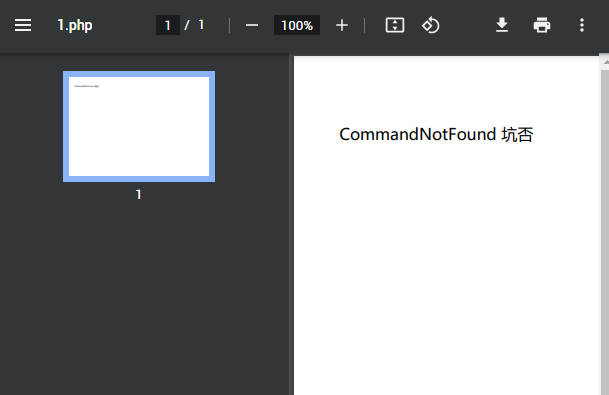
再执行之前 PDF 导出,中文显示正常,如图:
dompdf cli 命令行说明:
load_font.php 命令行运行说明:
Usage: .\load_font.php font_family [n_file [b_file] [i_file] [bi_file]]

font_family:      the name of the font, e.g. Verdana, 'Times New Roman',
                  monospace, sans-serif. If it equals to "system_fonts",
                  all the system fonts will be installed.

n_file:           the .ttf or .otf file for the normal, non-bold, non-italic
                  face of the font.

{b|i|bi}_file:    the files for each of the respective (bold, italic,
                  bold-italic) faces.

If the optional b|i|bi files are not specified, load_font.php will search
the directory containing normal font file (n_file) for additional files that
it thinks might be the correct ones (e.g. that end in _Bold or b or B).  If
it finds the files they will also be processed.  All files will be
automatically copied to the DOMPDF font directory, and afm files will be
generated using php-font-lib (https://github.com/PhenX/php-font-lib).

Examples:

./load_font.php silkscreen /usr/share/fonts/truetype/slkscr.ttf
./load_font.php 'Times New Roman' /mnt/c_drive/WINDOWS/Fonts/times.ttf
dompdf 中文乱码,完整测试代码:
<?php
require_once "vendor/autoload.php";

use Dompdf\Dompdf;
use Dompdf\Options;


$options = new Options();
$options->setDefaultFont('msyh');

$dompdf  = new Dompdf($options);
$dompdf  = new Dompdf($options);

$dompdf->loadHtml('
    <style>
    .font-zh {
        font-family: "msyh"
    }
    </style>

    <p class="font-zh">CommandNotFound 坑否</p>
');


$dompdf->setPaper('A4', 'landscape');
$dompdf->render();

// Output the generated PDF to Browser
// Attachment: 0 直接显示, 1 强制下载
$dompdf->stream(null, ['Attachment' => 0]);
MARK:DomPDF 保存 PDF 到指定目录,不需要输出浏览器,直接保存 PDF:
<?php
require_once 'vendor/autoload.php';

use Dompdf\Dompdf;

// 创建一个新的 Dompdf 实例
$dompdf = new Dompdf();

// 加载 HTML 内容
$html = '<h1>Hello, World!</h1><p>This is a test PDF document.</p>';
$dompdf->loadHtml($html);

// 设置纸张大小和方向
$dompdf->setPaper('A4', 'portrait');

// 渲染 PDF
$dompdf->render();

// 指定保存 PDF 的路径
$filePath = '/path/to/your/directory/output.pdf';

// 将生成的 PDF 保存到指定路径
file_put_contents($filePath, $dompdf->output());

echo "PDF 文件已保存到: " . $filePath;
DOMPDF 扩展阅读:
- dompdf/dompdf - Packagist - DOMPDF is a CSS 2.1 compliant HTML to PDF converter
- GitHub - dompdf/utils: Utility scripts for use with the dompdf library
- DomPDF 中文乱码解决
- pdftotext 命令
- ghostscript / gs 命令详解
- pdfunite 命令
- wkhtmltopdf 命令
- mutool 命令
- qpdf 命令
- weasyprint 命令