
Base64 与 URLEncode 简介
Base64 编码,是常用的编码方法。它是一种基于用64个可打印字符来表示二进制数据的表示方法。它通常用作存储、传输一些二进制数据编码方法!也是MIME(多用途互联网邮件扩展,主要用作电子邮件标准)中一种可打印字符表示二进制数据的常见编码方法!它其实只是定义用可打印字符传输内容一种方法,并不会产生新的字符集!有时候,我们学习转换的思路后,我们其实也可以结合自己的实际需要,构造一些自己接口定义编码方式。

Base64 简介
Base64 是最常见的一种基于 64 个可打印字符来表示二进制数据的方法。
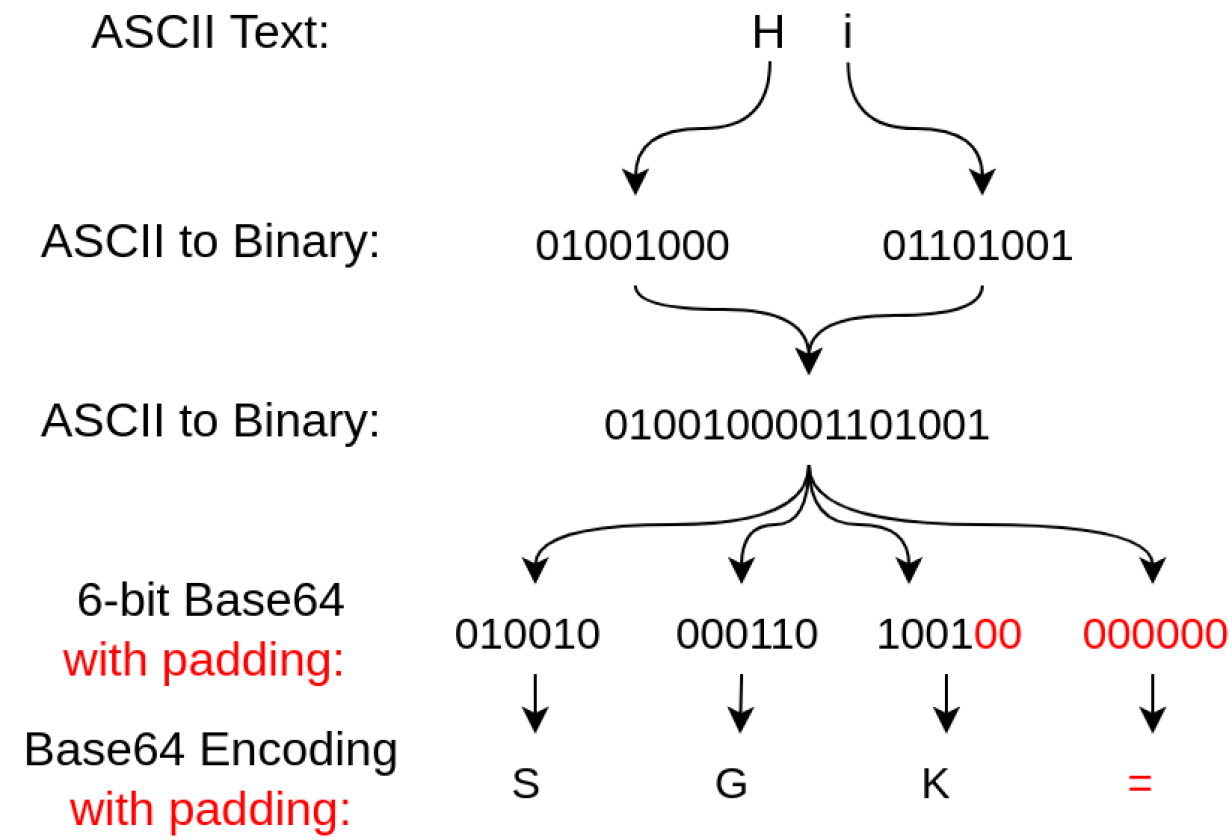
Base64 原理
- 首先, Base64 基于 64 个可打印字符, 这 64 个字符有
A~Z,a~z,0~9,+,/
['A', 'B', 'C', ... 'a', 'b', 'c', ... '0', '1', ... '+', '/']
3x8=24bit, 划为 4 组, 每组正好 6 个bit:
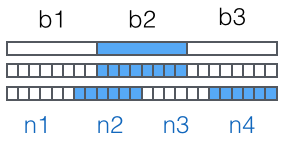
这样我们得到 4 个数字作为索引, 然后查表, 获得相应的 4 个字符, 就是编码后的字符串。
Base64 编码会把 3 字节的二进制数据编码为 4 字节的文本数据, 长度增加 33%, 好处是编码后的文本数据可以在邮件正文、网页等直接显示。
=, 表示补了多少字节, 解码的时候, 会自动去掉。
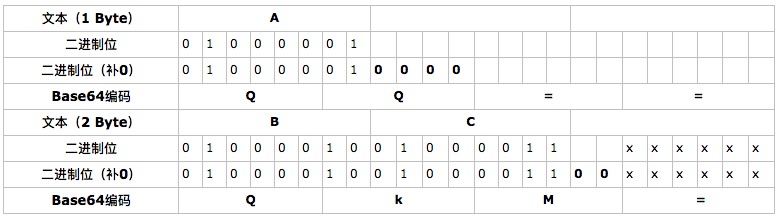
由于 = 在 URL、Cookie 里面会造成歧义, 所以, 很多 Base64 编码后会把 = 去掉。因为 Base64 是把3个字节变为4个字节, 所以, Base64 编码的长度永远是 4 的倍数, 因此, 加上 = 把 Base64 字符串的长度变为 4 的倍数,就可以正常解码了。
Base64 字母索引表
| 数值 | 字符 | 数值 | 字符 | 数值 | 字符 | 数值 | 字符 | |||
|---|---|---|---|---|---|---|---|---|---|---|
| 0 | A | 16 | Q | 32 | g | 48 | w | |||
| 1 | B | 17 | R | 33 | h | 49 | x | |||
| 2 | C | 18 | S | 34 | i | 50 | y | |||
| 3 | D | 19 | T | 35 | j | 51 | z | |||
| 4 | E | 20 | U | 36 | k | 52 | 0 | |||
| 5 | F | 21 | V | 37 | l | 53 | 1 | |||
| 6 | G | 22 | W | 38 | m | 54 | 2 | |||
| 7 | H | 23 | X | 39 | n | 55 | 3 | |||
| 8 | I | 24 | Y | 40 | o | 56 | 4 | |||
| 9 | J | 25 | Z | 41 | p | 57 | 5 | |||
| 10 | K | 26 | a | 42 | q | 58 | 6 | |||
| 11 | L | 27 | b | 43 | r | 59 | 7 | |||
| 12 | M | 28 | c | 44 | s | 60 | 8 | |||
| 13 | N | 29 | d | 45 | t | 61 | 9 | |||
| 14 | O | 30 | e | 46 | u | 62 | + | |||
| 15 | P | 31 | f | 47 | v | 63 | / |
URL Safe 的 Base64 编码
由于标准的 Base64 编码后可能出现字符 + 和 /, 在URL中就不能直接作为参数, 所以又有一种 url safe 的 base64 编码, 其实就是把字符 + 和 / 分别变成 - 和 _。
        // 下面这段代码来自于JDK1.8中的 java.util.Base64

        /**
         * This array is a lookup table that translates 6-bit positive integer
         * index values into their "Base64 Alphabet" equivalents as specified
         * in "Table 1: The Base64 Alphabet" of RFC 2045 (and RFC 4648).
         */
        private static final char[] toBase64 = {
            'A', 'B', 'C', 'D', 'E', 'F', 'G', 'H', 'I', 'J', 'K', 'L', 'M',
            'N', 'O', 'P', 'Q', 'R', 'S', 'T', 'U', 'V', 'W', 'X', 'Y', 'Z',
            'a', 'b', 'c', 'd', 'e', 'f', 'g', 'h', 'i', 'j', 'k', 'l', 'm',
            'n', 'o', 'p', 'q', 'r', 's', 't', 'u', 'v', 'w', 'x', 'y', 'z',
            '0', '1', '2', '3', '4', '5', '6', '7', '8', '9', '+', '/'
        };

        /**
         * It's the lookup table for "URL and Filename safe Base64" as specified
         * in Table 2 of the RFC 4648, with the '+' and '/' changed to '-' and
         * '_'. This table is used when BASE64_URL is specified.
         */
        private static final char[] toBase64URL = {
            'A', 'B', 'C', 'D', 'E', 'F', 'G', 'H', 'I', 'J', 'K', 'L', 'M',
            'N', 'O', 'P', 'Q', 'R', 'S', 'T', 'U', 'V', 'W', 'X', 'Y', 'Z',
            'a', 'b', 'c', 'd', 'e', 'f', 'g', 'h', 'i', 'j', 'k', 'l', 'm',
            'n', 'o', 'p', 'q', 'r', 's', 't', 'u', 'v', 'w', 'x', 'y', 'z',
            '0', '1', '2', '3', '4', '5', '6', '7', '8', '9', '-', '_'
        };
Base64 工具类
- 在 Guava 中有
BaseEncoding类 - 在 JDK8 中有专门的工具类
java.util.Base64 - 在 JDK7 中也有
sun.misc.BASE64Encoder和sun.misc.BASE64Decoder两个类 - 在 Spring 中, 也提供了一个
Base64Utils, 它自动根据反射来决定是使用 Java 8 的java.util.Base64还是Apache Commons Codec的org.apache.commons.codec.binary.Base64 - 除了
JDK7, 其他的工具类中都有url safe的Base64编码方法, 而且 JDK7 中会产生换行符!
    // guava 工具类的使用
    public void testBase64() {
        // 原串
        String origin = "abc";
        // encode
        String encodeString = BaseEncoding.base64().encode(origin.getBytes());
        // decode
        String result = new String(BaseEncoding.base64().decode(encodeString));
        // result = origin
        Assert.assertEquals(origin, result);
    }

    // Spring 工具类的使用
    public void testBase64() {
        // 原串
        String origin = "abc";
        // encode
        String encodeString = Base64Utils.encodeToString(origin.getBytes());
        // decode
        String result = new String(Base64Utils.decodeFromString(encodeString));
        // result = origin
        Assert.assertEquals(origin, result);
    }

    // JDK8 工具类的使用
    public void testBase64() {
        // 原串
        String origin = "abc";
        // encode
        String encodeString = Base64.getEncoder().encodeToString(origin.getBytes());
        // decode
        String result = new String(Base64.getDecoder().decode(encodeString.getBytes()));
        // result = origin
        Assert.assertEquals(origin, result);
    }

    // JDK7 工具类的使用(解码时会抛出 IOException)
    public void testBase64() {
        // 原串
        String origin = "abc";

        // encode, 如果原串比较长, 这个方法得到的签名会有换行符, 所以最好不要用JDK7的这个工具
        String encodeString = new BASE64Encoder().encodeBuffer(origin.getBytes());

        // decode
        String result = null;
        try {
            result = new String(new BASE64Decoder().decodeBuffer(encodeString));
        } catch (IOException e) {
            logger.error("Base64解码失败", e);
        }

        // result = origin
        Assert.assertEquals(origin, result);
    }
URLEncode 简介
URLEncoder 和 URLDecoder 用于完成普通字符串和 application/x-www-form-urlencoded MIME 类型的字符串之间的相互转换。
编码规则:
- 字母 (
a-z,A-Z), 数字 (0-9), 点(.), 星号(*), 横线(-), 下划线(_)不变 - 空格( )变为加号 (
+) - 其他字符变为
%XY形式, XY 是两位 16 进制数值 - 在每个
name=value对之间放置 & 符号(这条规则跟编码没关系)
URLEncode 工具类
JDK 自带了两个工具类 URLEncoder 和 URLDecoder, 下面是用法:
    @Test
    public void testURLEncode() {
        String str = "*. -_~!";
        System.out.println(str);     // *. -_~!
        String encode = URLEncoder.encode(str);
        System.out.println(encode);  // *.+-_%7E%21
        encode = URLEncoder.encode(encode);
        System.out.println(encode);  // *.%2B-_%257E%2521
        // 注意编码两次是不一样的
        String decode = URLDecoder.decode(encode);
        System.out.println(decode);  // *.+-_%7E%21
        decode = URLDecoder.decode(decode);
        System.out.println(decode);  // *. -_~!
    }