ghostscript 命令详解
A B C D E F G H I J K L M N O P Q R S T U V W X Y Z

ghostscript 命令安装:
-bash/zsh: ghostscript command not not found

# Windows (WSL2)
sudo apt-get update sudo apt-get install ghostscript

# Debian
apt-get install ghostscript

# Ubuntu
apt-get install ghostscript

# Alpine
apk add ghostscript

# Arch Linux
pacman -S ghostscript

# Kali Linux
apt-get install ghostscript

# CentOS
yum install ghostscript

# Fedora
dnf install ghostscript

# OS X
brew install ghostscript

# Raspbian
apt-get install ghostscript

# Docker
docker run cmd.cat/ghostscript ghostscript
ghostscript 命令补充说明:
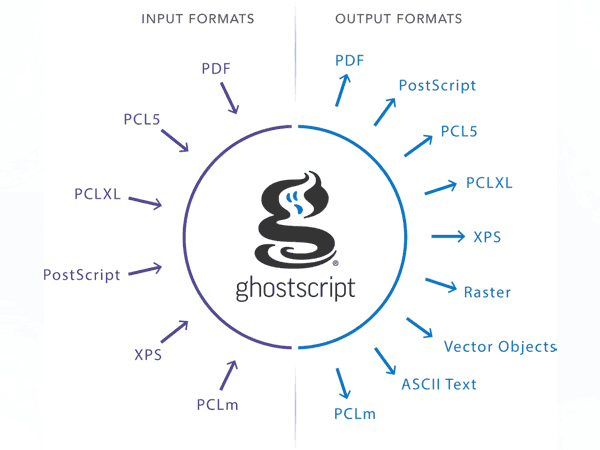
Ghostscript
Ghostscript - gs 是一套软件,它提供了一个 PostScript 解释器、一组 C 程序(Ghostscript 库,用于实现 PostScript 语言中的图形功能)以及一个可移植文档格式 (PDF) 文件解释器。
Ghostscript 将 PostScript 代码转换为许多常见的位图格式,例如您的打印机或屏幕可以识别的格式。Ghostscript 通常用于显示 PostScript 文件以及将 PostScript 文件打印到非 PostScript 打印机。如果您需要显示 PostScript 文件或将其打印到非 PostScript 打印机,则应安装 Ghostscript。安装 Ghostscript 时,还需要安装 ghostscript-fonts 软件包。
gs(gswin32c、gswin32、gsos2)命令会调用 Ghostscript,它是 Adobe Systems 的 PostScript 和 PDF 语言的解释器。gs 按顺序读取“文件”,并将其作为 Ghostscript 程序执行。执行完毕后,它会从标准输入流(通常是键盘)读取更多输入,并逐行解释。当遇到 quit 命令(无论是在文件中还是通过键盘输入)、文件结束或收到中断信号(例如键盘上的 Control-C)时,解释器会正常退出。
ghostscript 命令语法:
gs [ options ] [ files ] ... (Unix, VMS)
gswin32c [ options ] [ files ] ... (MS Windows)
gswin32 [ options ] [ files ] ... (MS Windows 3.1)
gsos2 [ options ] [ files ] ... (OS/2)
ghostscript 环境:
GS_OPTIONS
      String of options to be processed before the command line options

GS_DEVICE
      Used to specify an output device

GS_FONTPATH
      Path names used to search for fonts

GS_LIB
Path names for initialization files and fonts

TEMP
Where temporary files are made
ghostscript Special Names:
-dDISKFONTS
      Causes individual character outlines to be loaded from the disk the first time they are encountered. (Normally Ghostscript loads all the character outlines when it loads a font.) This may allow loading more fonts into RAM, at the expense of slower rendering.

-dNOCACHE
      Disables character caching. Useful only for debugging.

-dNOBIND
      Disables the "bind" operator. Useful only for debugging.

-dNODISPLAY
      Suppresses the normal initialization of the output device. This may be useful when debugging.

-dNOPAUSE
      Disables the prompt and pause at the end of each page. This may be desirable for applications where another program is driving Ghostscript.

-dNOPLATFONTS
      Disables the use of fonts supplied by the underlying platform (for instance X Windows). This may be needed if the platform fonts look undesirably different from the scalable fonts.

-dSAFER
      Disables the "deletefile" and "renamefile" operators and the ability to open files in any mode other than read-only. This strongly recommended for spoolers, conversion scripts or other sensitive environments where a badly written or malicious PostScript program code must be prevented from changing important files.

-dWRITESYSTEMDICT
      Leaves "systemdict" writable. This is necessary when running special utility programs such as font2c and pcharstr, which must bypass normal PostScript access protection.

-sDEVICE=device
      Selects an alternate initial output device, as described above.

-sOutputFile=filename
      Selects an alternate output file (or pipe) for the initial output device, as described above.
ghostscript / gs 命令实例:
gs 命令会将 input.pdf 文件转换为名为 output.jpg 的 JPEG 图像文件。:
gs -sDEVICE=jpeg -o output.jpg input.pdf
ghostscript / gs 命令生成一个简单的 PDF 文件:
## Create a sample PDF file
echo "This is a sample PDF file." > sample.pdf
gs 命令使 sample.pdf 转换成一个图片 -o sample.jpg:
gs -sDEVICE=jpeg -o sample.jpg sample.pdf
上述命令默认使用如下选项配置:
- -sDEVICE=jpeg: Specifies the output device as JPEG.
- -o sample.jpg: Specifies the output file name as sample.jpg.
- sample.pdf: The input PDF file to be converted.
要将 PDF 文件转换为 PNG 图像,可以使用 gs 执行以下命令:
gs -sDEVICE=png16m -o sample.png sample.pdf

------------
GPL Ghostscript 9.55.0: Rendering page 1...
此命令的唯一区别在于 -sDEVICE=png16m 选项,该选项指定输出设备为 16 位彩色 PNG 图像。
使用 gs 命令优化 sample_large.pdf 文件(类似 ILovePDF 网站提供的功能):
gs -sDEVICE=pdfwrite -dCompatibilityLevel=1.4 -dPDFSETTINGS=/screen -dNOPAUSE -dQUIET -dBATCH -sOutputFile=sample_optimized.pdf sample_large.pdf
上述优化 PDF 命令说明:
- -sDEVICE=pdfwrite: Specifies the output device as PDF.
- -dCompatibilityLevel=1.4: Sets the PDF compatibility level to 1.4.
- -dPDFSETTINGS=/screen: Optimizes the PDF for on-screen viewing.
- -dNOPAUSE -dQUIET -dBATCH: Suppresses the progress output and runs Ghostscript in batch mode.
- -sOutputFile=sample_optimized.pdf: Specifies the output file name as sample_optimized.pdf.
- sample_large.pdf: The input PDF file to be optimized.
ghostscript /gs 命令扩展阅读:
- Ghostscript 官网
- ghostscript 命令详解
- qpdf 命令
- pdfjoin 命令
- weasyprint 命令
- pdftotext 命令
- DomPDF 中文乱码解决
- pdfunite 命令
- wkhtmltopdf 命令
- mutool 命令
CommandNotFound ⚡️ 坑否 - 其他频道扩展阅读:
ghostscript 命令评论
-
convert 命令
cowsay 命令
cowthink 命令
espeak 命令
feh 命令
ffmpeg 命令
fim 命令
flac 命令
ghostscript 命令
gnuplot 命令
imgp 命令
inkscape 命令
jpegoptim 命令
julia 命令
minetest 命令
montage 命令
mpv 命令
mutool 命令
optipng 命令
pdfjoin 命令
pdftotext 命令
pdfunite 命令
qpdf 命令
redshift 命令
weasyprint 命令
wkhtmltopdf 命令
youtube-dl 命令
zopflipng 命令