
VSCode 自定义主题
VSCode 自定义主题 workbench.colorCustomizations 配置备份 ..
VSCode 的 colorCustomizations FYI:
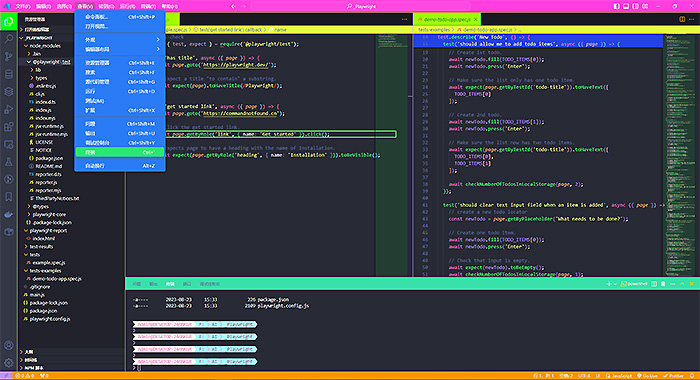
"workbench.colorCustomizations": {
	"breadcrumb.background": "#e1fd41",
        "breadcrumb.focusForeground": "#5a00ad",
        "editorStickyScroll.background": "#2542e4",
        "editorStickyScrollHover.background": "#bdb21f",
        "editor.wordHighlightBorder": "#c1ff32",
        "titleBar.activeBackground": "#ff3edf",
        "titleBar.inactiveBackground": "#ffaff2",
        "menu.background": "#2a7bf5",
        "menu.selectionBackground": "#2ae672",
        "sideBar.border": "#88ff00",
        "minimapSlider.background": "#2bff007a",
        "minimap.background": "#00c7211f",
        "minimap.errorHighlight": "#ff0000",
        "minimap.selectionHighlight": "#ff0000",
        "minimapSlider.hoverBackground": "#66ff00b6",
        "minimapSlider.activeBackground": "#00ff0dce",
        "minimap.findMatchHighlight": "#88ff00",
        "titleBar.border": "#88ff00",
        "statusBar.border": "#88ff00",
        "tab.activeBorder": "#ff008c",
        "icon.foreground": "#ffd900",
        "button.background": "#50cc09",
        "tab.activeBackground": "#9dff00",
        "tab.border": "#00ffc8",
        "tab.unfocusedInactiveForeground": "#ff0000",
        "editor.lineHighlightBorder": "#84ff79",
        "tab.activeBorderTop": "#ff8800",
        "tab.activeForeground": "#0b8150",
        "tab.hoverBackground": "#01b939",
        "tab.hoverBorder": "#f36411",
        "editorLineNumber.activeForeground": "#30e7ff",
        "activityBar.activeBackground": "#00ff15",
        "statusBar.background": "#ff9204",
        "statusBarItem.activeBackground": "#ff6600",
        "panel.background": "#6028c7",
        "panelTitle.inactiveForeground": "#cfcccc",
        "activityBar.border": "#88ff00",
        "statusBarItem.hoverBackground": "#ff28c9",
        "activityBar.background": "#d8ffe8"
    },
另外,我习惯开启 VSCode 的 stickyScroll 为 enable:
"editor.stickyScroll.enabled": true,